Chapter 2 — Architecture
Component Communication
How the SIP Connector, Conversation Controller and BlockFlow exchange audio, text and control messages — and the end-to-end call flow between a user and the VoiceBot.
SIP Connector
The SIP Connector manages interaction with the PBX and establishes RTP channels for bidirectional audio. Once the SIP handshake completes, it routes RTP streams between components:
- Incoming streams originate from the user and are forwarded to the Conversation Controller for processing.
- Outgoing streams carry the VoiceBot response from the Conversation Controller back through the PBX to the user.
Message protocol
Voice components and BlockFlow exchange two message types over a textual protocol. Text messages transfer user input to the AI agent and the agent's responses back to the user. Control messages modify the system's default behaviour.
| Message type | Description |
|---|---|
| Text | A textual message received from the chatbot, typically containing the response meant for the user. |
| Control | A special message that modifies a system parameter or behaviour — for example instructing the system to wait longer for a user expected to speak at length. |
Attributes of the text message type
| Attribute | Type | Description |
|---|---|---|
| message | String | Textual information that should be presented to the user. |
| session_id | String | The ID of the conversation session. |
| last_message | Integer | last_message=1 indicates the received message is the last one and the next step is for the user to speak. It is part of the JSON payload, not a control message — so a message can carry text to be read to the user while also signalling that it is final. |
| vdn | String | null or a number. If a VDN number is set, the call will be transferred to the specified number. |
Control message parameters
| Parameter | Example | Description |
|---|---|---|
| Submit | [control]submit=true[/control] | Send the accumulated messages to the user immediately so they do not have to wait, while indicating that more messages will follow before the final one. |
| Duration | [control]duration=12[/control] | Listen to the user query for a maximum of 12 seconds. Beyond that limit the system stops listening and processes the input. |
| Silence | [control]silence=4[/control] | Act on a silence period of 4 seconds. If no speech is detected for this duration, the query is assumed complete and the captured audio is processed. |
| End call | [control]endcall=1[/control] | When set to 1, this is the final message from the chatbot and the call should be terminated. When 0, no action is taken and the call continues. |
Conversation Controller
The Conversation Controller is the central orchestrator, integrating the chatbot solution with the PBX and managing real-time audio processing in both directions. Its responsibilities:
- Transcribe received audio from the incoming stream and send it to BlockFlow.
- Return a success or failure response.
- Hold the SIP Connector until a chatbot response is received.
- Buffer responses that are neither
submitnorlast_message, then flush the buffer once either arrives. - If the chatbot does not respond within 28 seconds, send existing messages or redirect the user to an agent.
- Synthesise text to speech before returning messages to the SIP Connector.
End-to-end conversational call flow
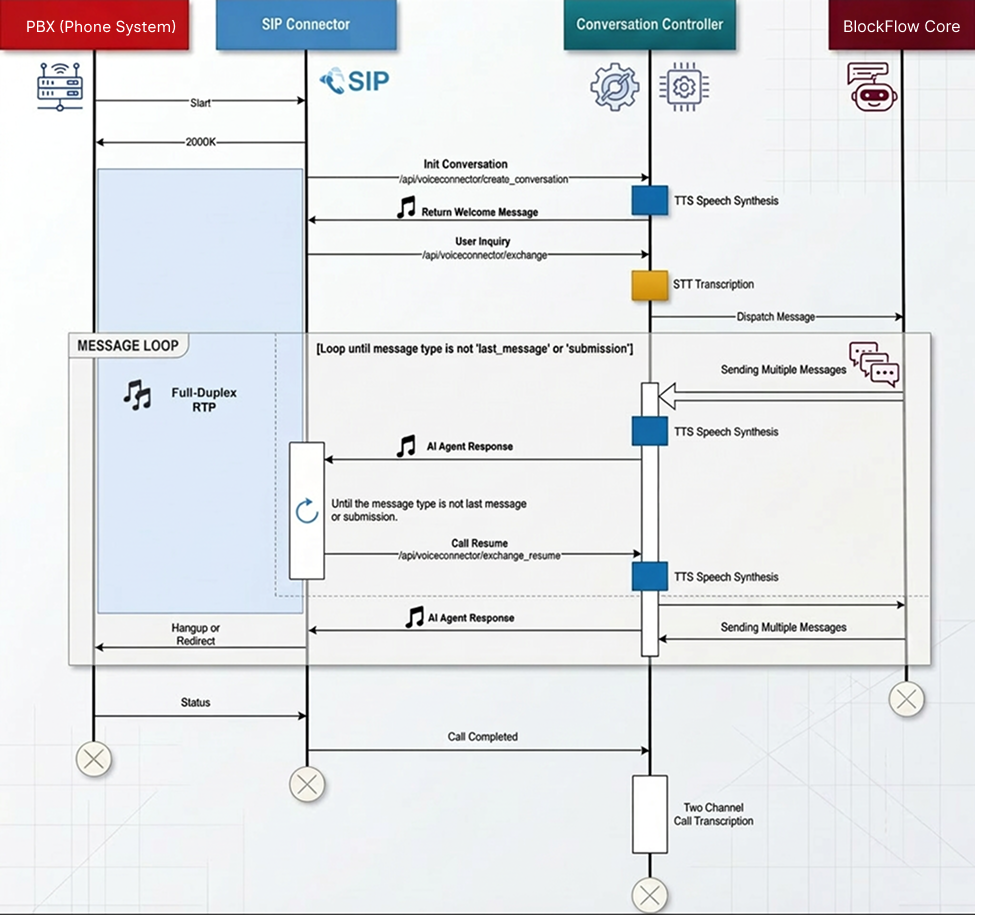
Figure 2 — Use-case diagram of the integration between the PBX and the BlockFlow module.
- The external PBX connects to the OpenBrain Software PBX through a SIP trunk, establishing a TCP connection on port 5060 for call signalling and session initiation.
- Full-duplex RTP channels over UDP are created — one for the incoming user audio, one for the outgoing synthesised speech.
- Streams are forwarded to the RTP Relay submodule of the SIP Connector, which communicates with the Software PBX over the Asterisk Gateway Interface (AGI) for dynamic call control.
- The Conversation Controller is notified and initialised through an API endpoint; the caller ID (MSISDN) and references to the incoming and outgoing RTP streams are exchanged.
- A welcome message is synthesised and streamed to the caller, followed by a beep signalling that the user may speak. The default speaking window is 12 seconds and recording stops after 3 seconds of silence; both are adjustable through control messages.
- Captured audio is forwarded to the Conversation Monitor, which orchestrates the speech processing pipeline.
- The STT module transcribes the audio through a blocking RPC call coordinated by the RabbitMQ message broker.
- The transcription is forwarded to the BlockFlow endpoint, where the scenario logic executes.
- The system waits for a BlockFlow response — a final message, a control message, a redirection message, or a session end message.
- The response text is converted to speech by the TTS module and transmitted through the outgoing RTP stream, via the SIP Connector and PBX, to the user.
- The loop repeats for N interaction cycles as defined by the scenario.
Termination and post-processing
- On a redirection message, the Controller executes a Transfer through AGI, closes the RTP channels and marks the conversation Redirected.
- On a call termination message, the session ends, channels close and the conversation is marked Finished.
- Once channels are closed, the SIP Connector triggers the “Call Completed” endpoint in the Conversation Monitor, starting post-processing: full transcript generation, audio segmentation by silence threshold, transcript editing for reviewers, and model improvement pipelines fed by corrected transcripts.
- On a global exception or system failure, the exception handler transfers the call to a human agent, ensuring service continuity.