Chapter 6 — KnowledgeBase
Overview & Architecture
Every VoiceBot is backed by one or more Topics. Each Topic maps to an isolated RAG server instance holding curated documents, an auto-generated knowledge graph and a tunable retrieval pipeline.
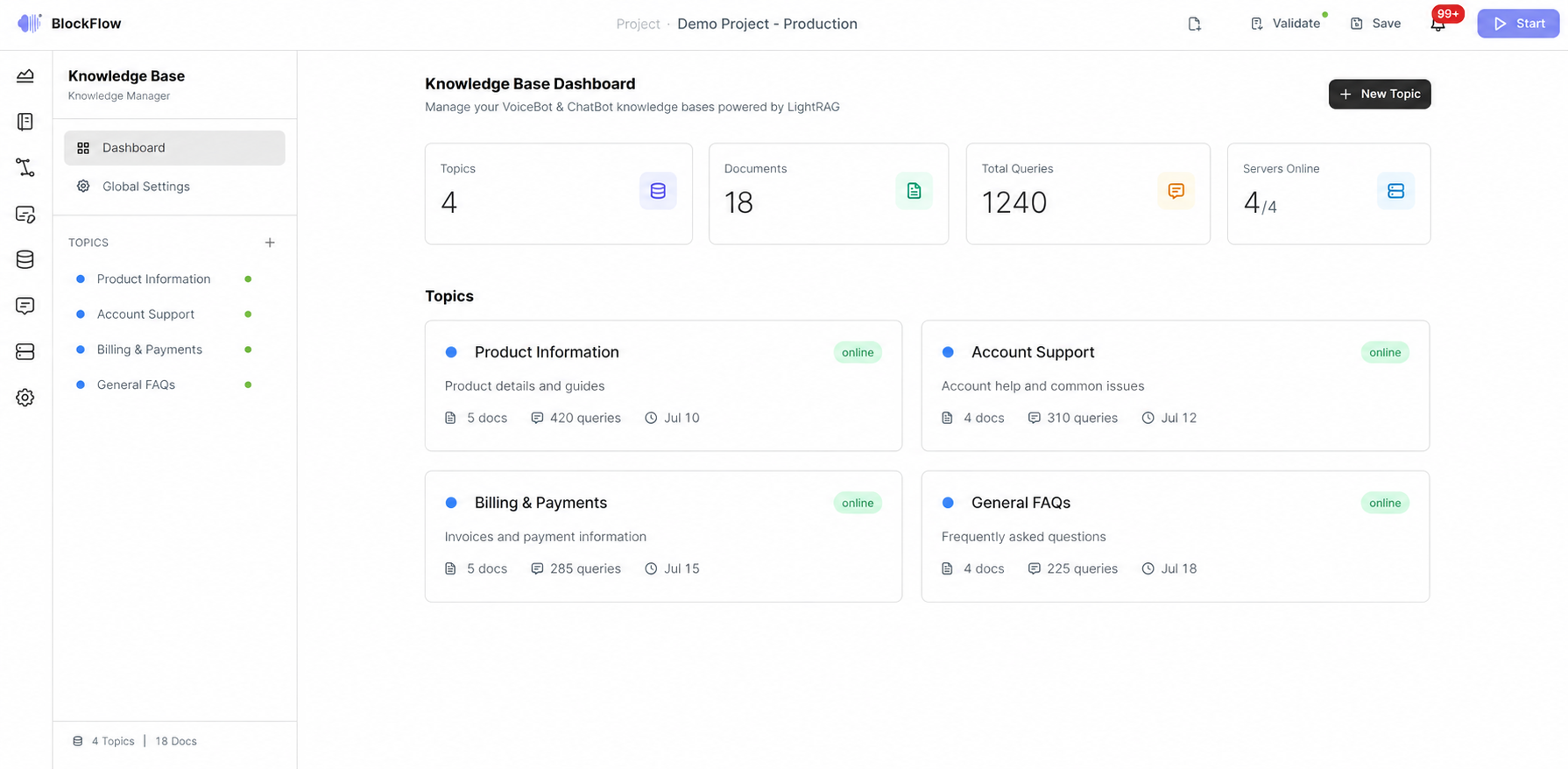
Figure 1 — KnowledgeBase management administration console.
What administrators do here
- Organise knowledge into thematic Topics — for example “Product Support”, “Sales & Marketing”, “HR & Onboarding”.
- Upload documents that are automatically chunked, embedded and indexed.
- Query the knowledge base using five supported search modes.
- Visualise the knowledge graph to understand entity relationships extracted from documents.
- Configure and monitor the underlying RAG server instances.
Supported document types
TXT MD DOCX PDF PPTX XLSX RTF ODT EPUB HTML / HTM TEX JSON XML YAML / YML CSV LOG CONF SQL BAT SH C H CPP PY JAVA
The list spans office and text formats, e-books and markup, structured data and configuration files, and source code in C, C++, Python and Java.
Key features
| Feature | Description |
|---|---|
| Multi-topic management | Create, edit and delete Topics, each with its own colour, tags and dedicated RAG server. |
| Drag & drop upload | Upload documents by drag-and-drop or file picker, with real-time progress and chunking and indexing feedback. |
| Document preview | View document metadata — size, chunks, status, upload date — and content directly in the browser. |
| Multi-mode query interface | Query using five search modes (Naive, Local, Global, Hybrid, Mix) with configurable Top-K, temperature and context-only options. |
| Interactive knowledge graph | Canvas-based visualiser with zoom, pan, drag, search and type filtering, showing entities, relations, chunks and their connections. |
| Server health monitoring | Real-time health checks with online, offline and connecting indicators on every Topic card and in the sidebar. |
| Hybrid API client | Attempts real HTTP calls to RAG servers and falls back automatically on failure, so the interface keeps working. |
| Global configuration | Centralised settings for API keys, default ports, health check intervals, security and logging. |
| RAG tuning | Per-topic configuration of LLM model, embedding model, chunk size, chunk overlap, max tokens, temperature, Top-K, graph community level and graph search toggle. |
Topic-per-server model
Every Topic maps to an independent RAG server instance. This one-to-one mapping provides:
- Data isolation — different Topics can use different LLM and embedding models optimised for specific languages.
- Domain separation — documents, graph entities and vector indices are fully isolated across Topics, with no cross-contamination.
- Independent scaling — each server is sized, deployed and restarted according to its own document volume and query load.
- Operational independence — a failure or reindex on one Topic does not affect any other.
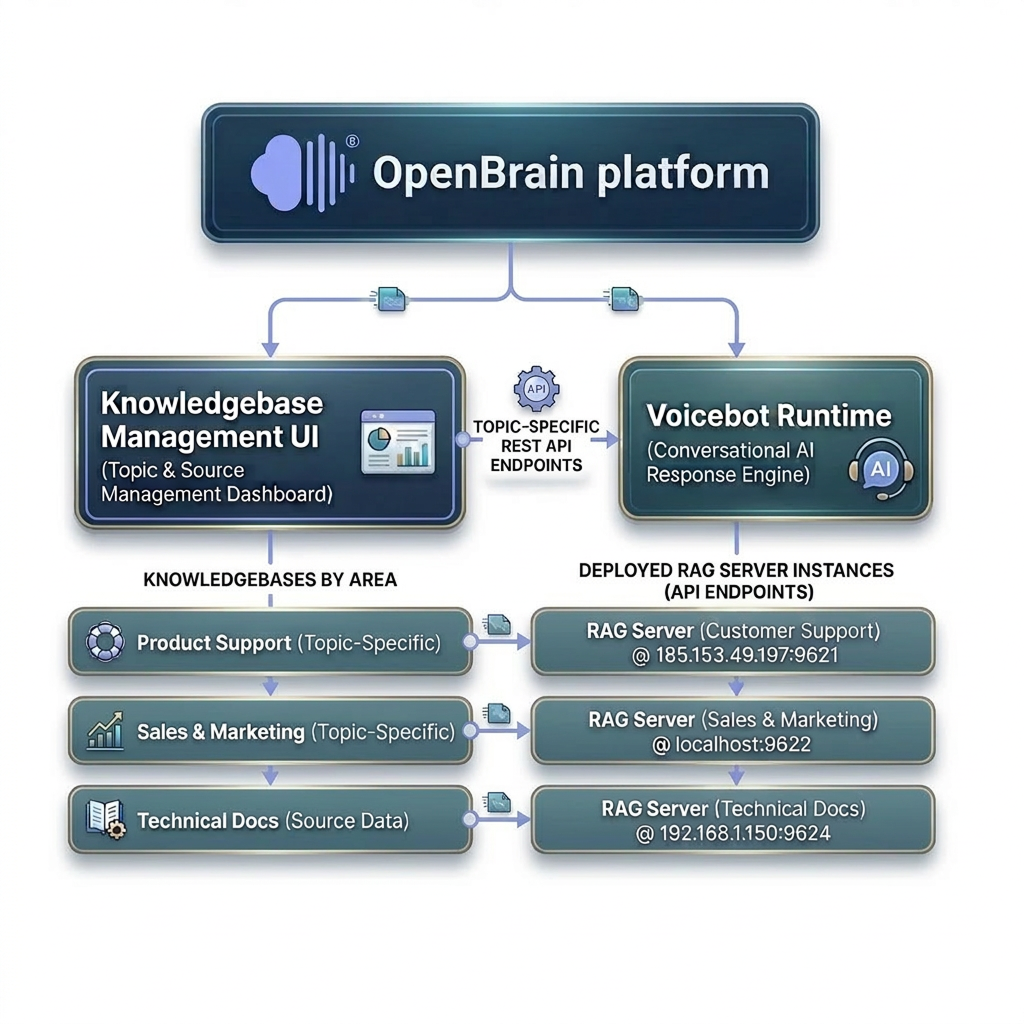
Figure 2 — KnowledgeBase data and language isolation.
Text ingestion pipeline
Uploaded documents pass through eight stages before becoming queryable.
Step 1
Document upload & validation
The file is uploaded through the drag-and-drop interface or file picker. The server validates type and size and acknowledges receipt while the interface shows real-time progress.
Step 2
Text extraction & normalisation
The raw file is parsed into plain text — OCR or text-layer extraction for PDFs, XML unpacking for DOCX, direct reads for Markdown and plain text — then normalised for whitespace, encoding and special characters.
Step 3
Chunking with overlap
The text is split into chunks governed by two parameters: chunk size (default 1200 characters) and chunk overlap (default 100 characters), so ideas spanning a boundary are not lost.
Step 4
Vector embedding generation
Each chunk passes through an embedding model to produce a high-dimensional vector capturing its semantic meaning, enabling similarity search.
Step 5
Vector store indexing
Vectors, with references back to their source chunks and parent documents, are inserted into a vector store optimised for approximate nearest-neighbour lookups.
Step 6
Entity & relationship extraction
An LLM scans each chunk to identify named entities — people, products, concepts, technical terms — and the relationships between them, returning structured (subject, predicate, object) triples.
Step 7
Knowledge graph construction
Entities become nodes and relationships become edges in a persistent graph. Duplicates are merged and a community detection algorithm groups related nodes into hierarchical communities (default depth 2); each community receives a generated summary that powers the Global and Mix modes.
Step 8
Status update & availability
Once both the vector index and the graph are populated, the document's status moves from processing to indexed and it becomes fully queryable.
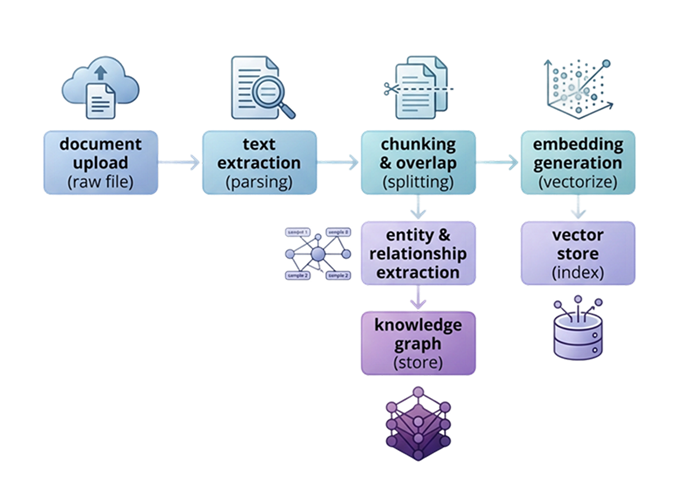
Figure 3 — Text ingestion into the KnowledgeBase pipeline.
Configuration influence
Every RAG parameter affects this pipeline directly. Changing chunkSize alters how granular the splits are; changing embeddingModel changes the vector space; changing graphCommunityLevel controls how many layers of community summaries are built. All parameters can be adjusted per Topic from the Settings tab before uploading documents.
Retrieval and answer generation
A query follows one of five retrieval strategies, selected in the Search Mode dropdown. Each determines what is retrieved before the LLM generates its answer.
| Mode | Retrieved | How it works |
|---|---|---|
| Naive | Top-K most similar chunks from the vector store | The query is embedded and compared against all chunk vectors by cosine similarity; the closest chunks become the context. Fast and straightforward, best for factual lookups. |
| Local | Graph neighbourhood around matched entities | Entities mentioned in the query are located in the knowledge graph, and their immediate neighbourhood is traversed to gather structured context about those entities. |
| Global | Community-level summaries from the graph | Pre-computed summaries of entire communities are retrieved, providing broad thematic context that captures high-level patterns across many documents. |
| Hybrid | Chunks plus local graph neighbourhood | Combines Naive and Local: chunk similarity provides textual evidence while graph traversal adds entity context. The merged context is deduplicated and ranked. Recommended default. |
| Mix | Local neighbourhood plus global summaries | Combines Local and Global, capturing both fine-grained entity detail and broad thematic patterns — ideal for complex questions spanning multiple concepts. |
After retrieval, the context fragments are assembled into a single prompt and sent to the configured LLM together with the original query. The answer is returned to the interface with metadata: source document names, token usage, processing time and the search mode used.