Chapter 7 — MCP & RAG
MCP Architecture
The Model Context Protocol provides a standardised mechanism for connecting AI Agents with external tools, services and data sources — a common interface around external capabilities rather than custom integration logic inside each Agent.
Instead of integrating each tool directly into the Agent, tools are exposed through MCP servers using a common protocol and structure. The key advantage is that the Agent can determine at runtime which available tool should be used, based on the current user request and conversation context — tool execution does not need to be predefined as part of a fixed execution flow.
An MCP server can therefore be viewed as a standardised wrapper around one or more tools, defining how tools are described, discovered and invoked, and how their results are returned. MCP is the standard integration approach across the company, providing a consistent and reusable interface between Agents and external systems — simplifying the integration of new capabilities and improving maintainability and extensibility across Agent-based solutions.
MCP components
The architecture consists of the Agent, the MCP Registry, one or more MCP servers, and the capabilities those servers expose.
Agent
Interprets the user request and determines whether an external capability is required. Based on the available tool definitions and the current conversation context, it selects the appropriate tool at runtime.
MCP Registry
The centralised MCP client and communication layer between the platform and the available MCP servers. It provides access to server information, capability definitions and tool execution.
MCP Server
Exposes capabilities related to a specific domain, service or external system through the MCP protocol.
Capabilities
Servers can expose Tools (executable operations), Prompts (reusable prompt templates or instructions) and Resources (structured data or content). What a server exposes depends on its implementation.
MCP Tools
Individual operations the Agent can invoke. Each tool defines its purpose, input parameters and expected output; internally it may call an external API, database, internal service or another company system.
Resources are supported by the MCP protocol, but their availability within the platform depends on the current Registry implementation. This separation lets the Agent use external capabilities through a consistent interface without depending on the implementation details of the underlying systems.
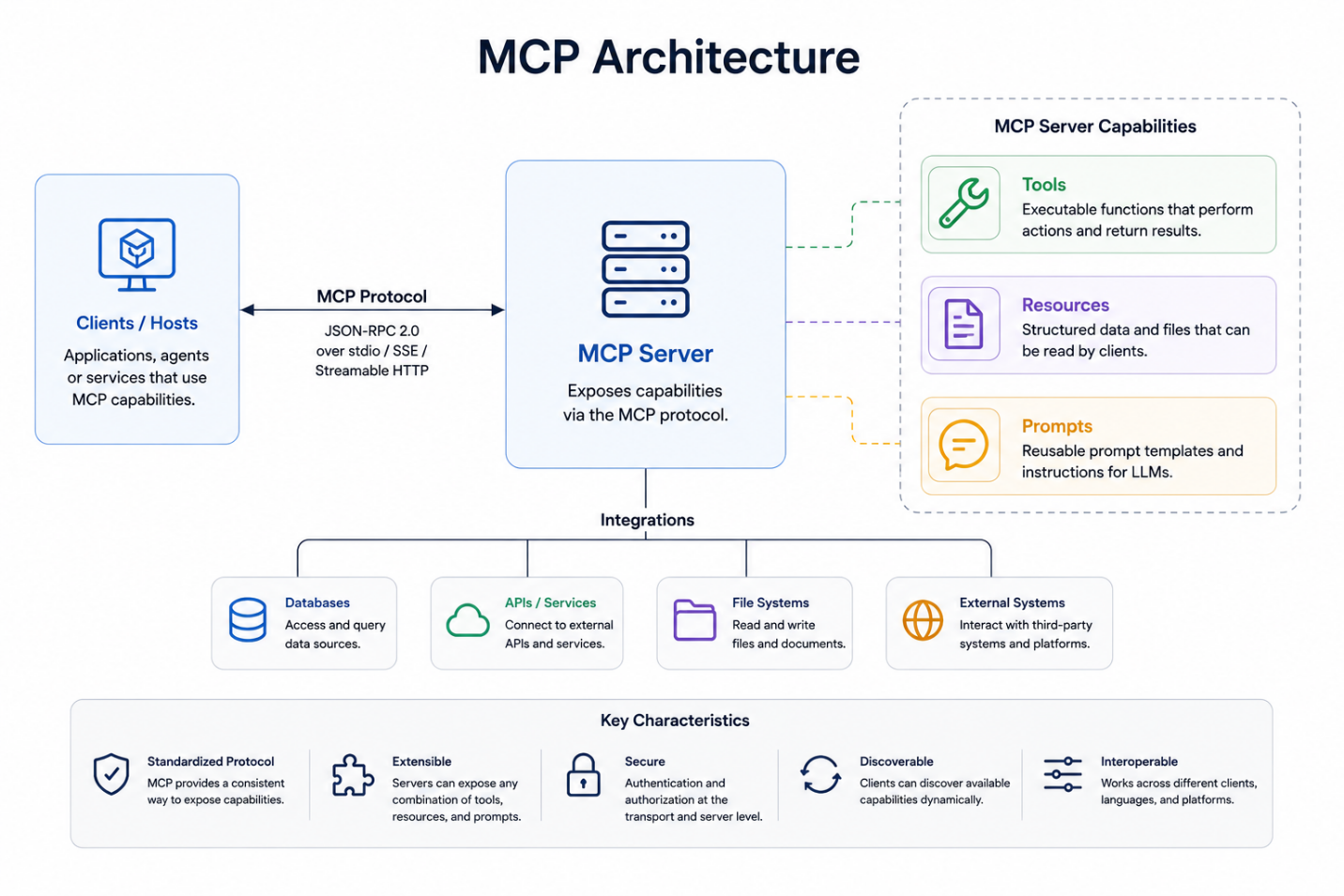
Figure 1 — MCP architecture overview.
MCP integration in the system
A single centralised MCP Registry is the common integration point for all MCP communication. Its address is configured once at system level; the platform talks to the Registry rather than connecting directly to individual MCP servers.
Each project can have access to one or more MCP servers, depending on the functionality and external data sources it requires. When an Agent operates within a project, only the servers and tools available to that project enter its execution context.
Project context → available MCP servers → available MCP tools → Agent tool selection → MCP Registry → selected MCP server → tool execution → execution result returned to the Agent
This allows project-specific capabilities to be defined while maintaining a single centralised MCP integration point for the entire system.
The MCP Registry
The Registry is the backend integration layer for MCP. It acts as the MCP client and provides a centralised interface for communication with the registered servers. Its main responsibilities:
- Retrieving the available MCP servers and their details.
- Retrieving the tools exposed by registered servers.
- Providing tool definitions and metadata to the platform.
- Executing MCP tools with the required input parameters.
- Returning tool execution results to the requesting component.
Because the application never communicates directly with individual servers, there is a single integration point for server discovery, tool discovery and tool execution. That reduces direct dependencies and the number of integration points to manage, and gives the platform one place where authentication, authorisation, request validation, logging and access control can be applied consistently. It also simplifies maintenance and future extensions, since MCP communication and execution logic are handled centrally rather than reimplemented per project.
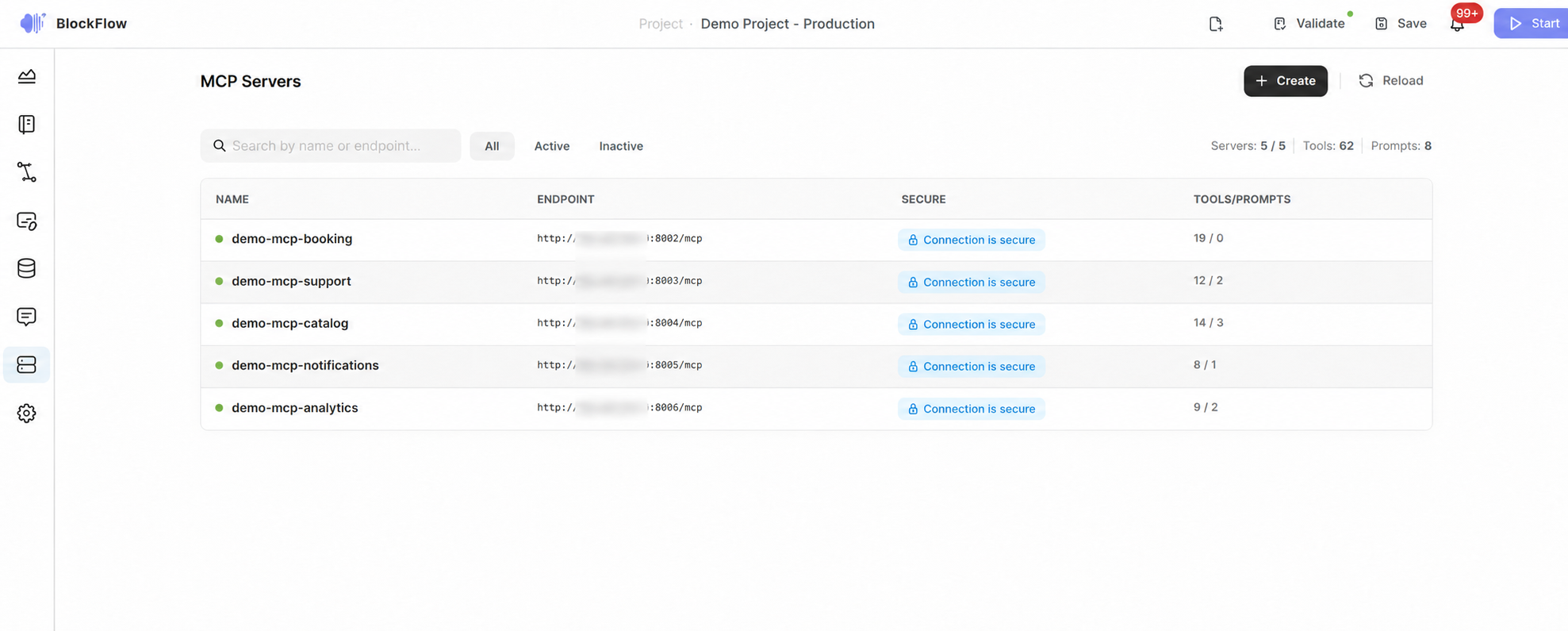
Figure 2 — MCP Registry page.