Chapter 6 — KnowledgeBase
Screens, API & Data Model
The KnowledgeBase console — dashboard, topic detail, document management, query interface and graph visualiser — plus its REST surface, configuration reference and data model.
Dashboard
- Summary statistics — total Topics, documents, queries and servers online.
- Topic cards — name, description, colour-coded server status, document and query counts, last updated date, tags and server address.
- Quick actions — a “New Topic” button and a dashed “Create New Topic” card.
Topic detail
Opening a Topic card reveals four tabs — Documents (list, search, preview, delete), Query (interactive interface with mode selection), Knowledge Graph (visual explorer) and Settings (server connection and RAG configuration). The header shows the topic name, colour indicator, server status badge, description and quick stats; a Ping button triggers an immediate health check.
Document management
Upload dialog
- Drag-and-drop zone with file type validation across the supported formats.
- File queue showing each pending file with name, size and status.
- Real-time progress per file: pending → uploading → processing → indexed.
- Files are uploaded to the RAG server via
POST /documents/filewith multipart form data.
Document list and preview
A searchable list with status badges (uploaded, processing, indexed, error), metadata for file size, chunk count and upload date, and per-row preview and delete actions with a confirmation dialog. The preview modal displays the full metadata grid alongside a scrollable, monospaced content preview and any custom metadata.
Query interface
- Query input — text field with Enter-to-submit.
- Settings panel — search mode dropdown, Top-K slider (1–200), “only need context” toggle and inline mode descriptions.
- Response card — the query, formatted response, mode badge, token count, copy button and source documents.
- Query history — expandable panel of past queries with timestamps, modes and response previews; click any item to reload it.
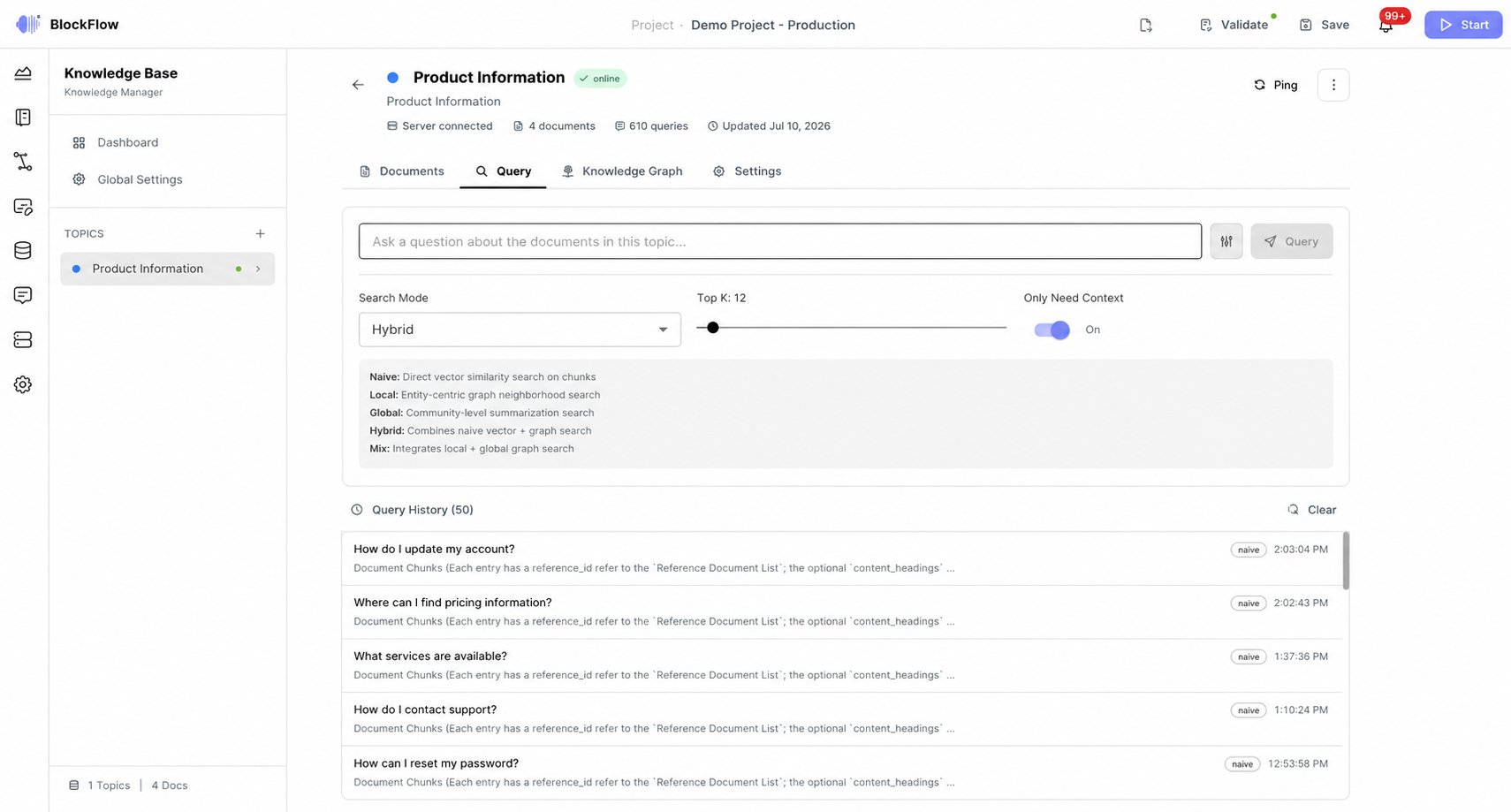
Figure 4 — Querying existing documents with different query modes.
Knowledge graph visualiser
An interactive HTML5 canvas visualisation with a custom force-directed layout. Zoom with the mouse wheel or the +/− buttons, pan by dragging empty space, drag individual nodes to reposition them, click a node to inspect its connections, highlight nodes matching a search term, and filter by type (Entity, Relation, Chunk, Topic). A colour-coded legend, a stats bar with total nodes, edges and entity count, and a node detail card complete the view.
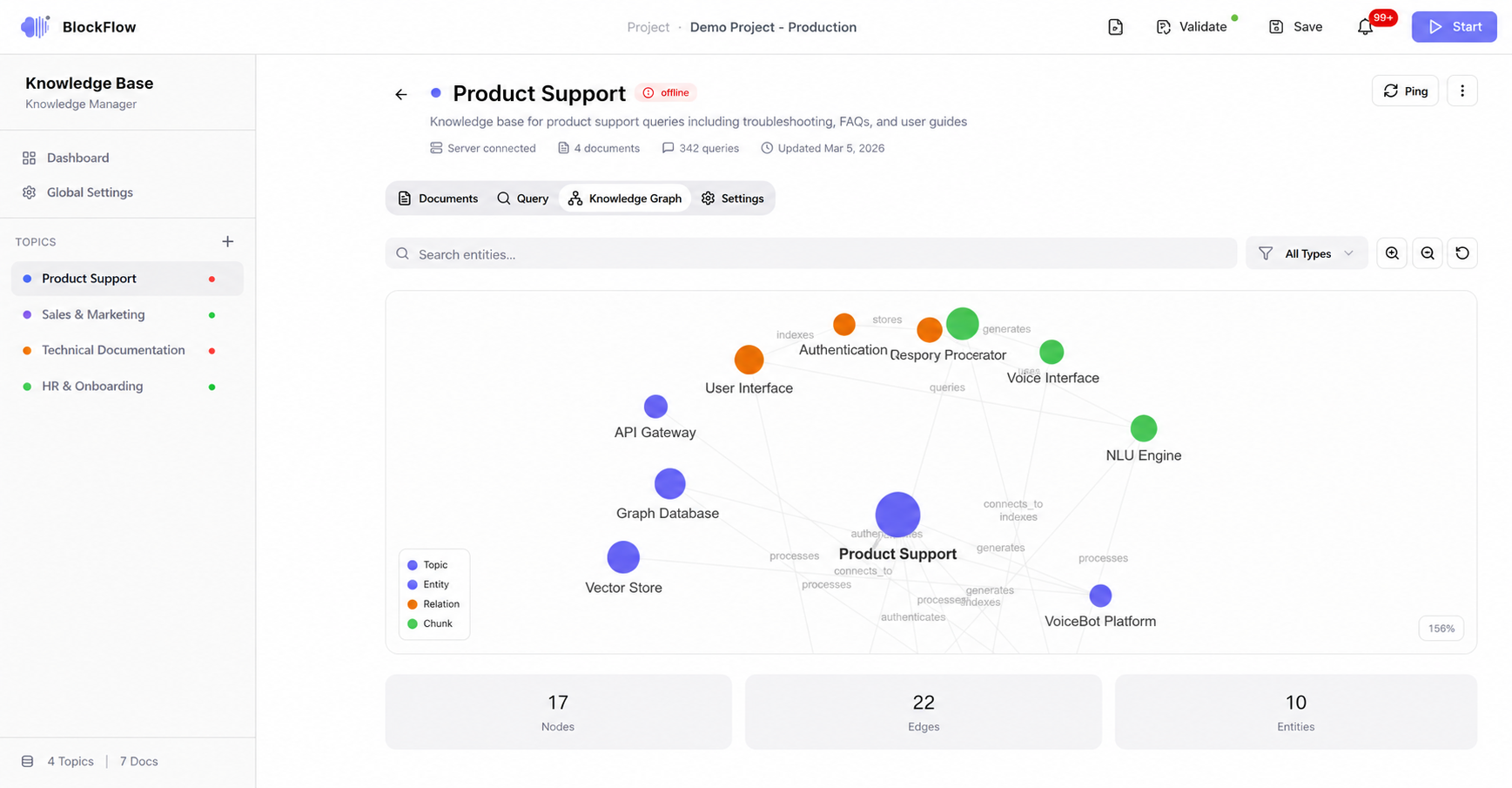
Figure 5 — Preview of knowledge representation in the KnowledgeBase.
Server configuration
Server connection — editable host, port, API key and working directory, a live API base URL preview, and Health Check and Save Connection buttons.
RAG configuration — LLM model selection (GPT-4o, Claude 3, Llama 3.1, Ollama, custom) and embedding model; chunk size (200–4000) and overlap (0–500); max tokens (256–16384) and temperature (0.00–2.00); graph search toggle, community level (1–5) and Top-K.
REST endpoints
| Method | Endpoint | Description |
|---|---|---|
| GET | /health | Server health check. |
| POST | /documents/file | Upload a file as multipart form data. |
| DELETE | /documents/{doc_id} | Delete a specific document. |
| POST | /query | Query the knowledge base. |
| GET | /graphs | Fetch the knowledge graph. |
| PUT | /config | Update server configuration. |
All endpoints accept an optional Authorization: Bearer <api-key> header.
RAG configuration defaults
| Field | Default | Description |
|---|---|---|
| llmModel | gpt-4o-mini | Language model used for generation. |
| embeddingModel | text-embedding-3-small | Model used for vector embeddings. |
| chunkSize | 1200 | Characters per chunk. |
| chunkOverlap | 100 | Overlap between consecutive chunks. |
| maxTokens | 4096 | Maximum tokens in the LLM response. |
| temperature | 0.7 | LLM sampling temperature. |
| topK | 60 | Number of retrieval results. |
| enableGraphSearch | true | Use the knowledge graph for retrieval. |
| graphCommunityLevel | 2 | Graph community detection depth. |
Data model
Three entities describe the KnowledgeBase state.
Topic
| id | string | Unique identifier (topic-{timestamp}). |
|---|---|---|
| name | string | Display name. |
| description | string | What this knowledge base covers. |
| server | RAGServer | Associated server configuration. |
| documents | Document[] | Uploaded documents. |
| createdAt / updatedAt | string (ISO 8601) | Creation and last modification timestamps. |
| documentCount | number | Total documents. |
| queryCount | number | Total queries executed. |
| tags | string[] | Categorisation tags. |
| color | string | Hex colour for interface indicators. |
RAGServer
| id | string | Server identifier. |
|---|---|---|
| host | string | Hostname or IP address. |
| port | number | Port number. |
| apiBase | string | Full base URL, e.g. http://host:port. |
| apiKey | string? | Optional bearer token. |
| status | "online" | "offline" | "connecting" | Current connectivity status. |
| workingDir | string? | RAG storage directory. |
Document
| id | string | Document identifier. |
|---|---|---|
| name | string | Filename. |
| type | string | MIME type. |
| size | number | Size in bytes. |
| content | string? | Text content for preview. |
| status | "uploaded" | "processing" | "indexed" | "error" | Processing status. |
| uploadedAt | string (ISO 8601) | Upload timestamp. |
| chunks | number? | Number of chunks created. |
| metadata | Record |
Custom metadata. |
Global settings
Platform-wide configuration covers API keys (OpenAI key, Ollama host URL), server defaults, security and logging, plus a server overview table listing every Topic with status indicators, addresses and document counts, and a “Check All” button for batch health checks.
| Setting | Description | Default |
|---|---|---|
| OpenAI API key | Used for GPT models and OpenAI embeddings. | — |
| Ollama host URL | Local LLM inference endpoint. | http://localhost:11434 |
| Default starting port | Base port for new RAG instances. | 9621 |
| Health check interval | Seconds between automatic health checks. | 60 |
| Auto health check | Periodically ping all servers. | true |
| Enable authentication | Require API keys for all requests. | true |
| Logging level | Console log verbosity. | info |